Google Slides Beautify Problems and the Absolute Nonsense of Turning Slides Into Pictures
I need to talk about Google Slides Beautify problems before I throw my laptop into the nearest historical reenactment trench. I tried the tool hoping for a quick glow up to my World War I lesson. What I received instead was a digital prank that turned every single slide into a giant uneditable picture. Who approved this idea and why do they 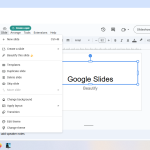 hate teachers?
Slides are supposed to be flexible. We change dates, swap questions, add a new vocabulary word when a class looks confused. Beautify decided my text was now a museum artifact. One typo became permanent. A wrong year became a monument to my shame. The entire point of Google Slides is the ability to edit, and this tool removed the one feature that matters most.
The “Beautify” That Breaks the Whole Point of Slides
Then came the image size disaster. The pictures grew so big that half the content vanished off student screens. Chromebooks showed only the top corner like a bad selfie. Phones refused to load anything at all. I spent my planning period resizing and cropping instead of, you know, planning actual teaching. These Google Slides Beautify problems turned a thirty minute task into an afternoon of rage typing.
I kept thinking I must be missing a secret button. Surely no designer would create a classroom tool that freezes all text into concrete. Yet there it was, smiling at me while my slides turned into decorative posters. Teachers do not need decorative posters. We need lessons that breathe and adapt and survive the chaos of a Tuesday.
Accessibility took a hit too. Screen readers cannot read text trapped inside images. Students with visual needs lost supports I built carefully over years. The tool did not beautify my lesson. It bulldozed it and planted plastic flowers on the rubble.
Real Classrooms Are Not a Demo Video
Colleagues told me the same story. One teacher said her science diagrams became so large that the labels covered the entire page. Another tried to fix a single spelling error and realized she would have to rebuild twenty slides from scratch. The Google Slides Beautify problems spread through our hallway faster than cold season.
Let us talk about real classrooms for a moment. We teach during surprise assemblies, fire drills, and schedule changes that make no sense. Technology should help us survive that circus. Instead this add on added another hoop on fire. Developers must imagine a peaceful office with unlimited time. Teachers live in a different universe.
What Actually Works Without Turning Your Slides Into Wallpaper
If you want design help without losing control, Canva offers far better options for educators at Canva for Education. You can improve visuals while keeping text alive and editable. That is the bare minimum standard. A tool should  decorate, not mummify.
For now I returned to plain Google themes. They are not glamorous, but at least they respect my right to change a comma. I would rather present simple slides that function than gorgeous ones that behave like billboards nailed to the wall. If you have been burned too, welcome to the club of Google Slides Beautify problems survivors.
A Few Survival Moves (Learned the Hard Way)
- Keep an untouched copy of every deck before experimenting.
- Resize images before uploading so nothing inflates into skyscraper mode.
- Use text boxes for text so content stays editable and accessible.
- Trust your teacher brain more than any magic button.
If this helped you, you might also like…
My post on constant pivot days and how tech chaos adds to teacher stress: Teacher burnout and the pivot problem.
Why This Makes Teachers So Angry
This fiasco connects to the bigger problem of teacher burnout. We already pivot constantly and tech failures pour gasoline on that stress. Tools should reduce pressure, not become another reason to cry in the supply closet. And what makes me angriest is how close this tool came to being great. The color suggestions were nice. The layouts looked  modern. With one small change to keep text editable, teachers would cheer. Instead we got a feature that feels designed by someone who has never met a living student.
Educational technology loves shiny promises. It tells us one click will transform our lessons into masterpieces. The reality is usually more duct tape and disappointment. The Google Slides Beautify problems are a perfect example of sparkle without sense.
Maybe Google will listen if enough teachers complain loudly enough. Until then I will beautify my slides the old fashioned way with actual text boxes and human judgment. Revolutionary idea, I know.
If you are tempted to try this add on, pour a cup of tea first and take a deep breath, if your home, I suggest alcohol. You might need both. And if you already fell into the same trap, welcome to the support group. Meetings are held in the copy room next to the jammed printer.
Technology can be wonderful when it respects classroom reality. This tool did not. It treated living lessons like wallpaper samples. Teachers deserve better than that.